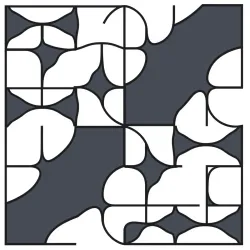
Generate unique, non-repeating tile patterns with the Aperiodic Tile Creation API for creative projects.
{"status":"ok","ts":1779302690.671844}
curl --location --request GET 'https://zylalabs.com/api/12630/aperiodic+tile+creation+api/24447/health+check' --header 'Authorization: Bearer YOUR_API_KEY'
{"patch_engine_semver":"1.0.0","supported_tile_families":["spectre_tile_1_1"],"roadmap":{"tile_families":[{"id":"spectre_tile_1_1","status":"supported","label":"Spectre / Tile(1,1)"},{"id":"einstein_hat_tile","status":"planned","label":"Einstein Hat monotile (same API hooks)"},{"id":"turtle_tile","status":"planned","label":"Companion turtle monotile family"}]},"free_tier_formats":["jpeg","jpg","png"],"supported_masks":["square","rectangle","circle","regular_hexagon","triangle","rounded_rect"],"supported_formats":["svg","csv","json","stl","stl_zip","obj_zip","glb","instance_json","png","jpg","jpeg"],"output_notes":{"glb":"3D tiled scene with one named, movable node per retained tile.","stl":"Whole-panel mesh output.","stl_zip":"Independent STL files, one per tile.","obj_zip":"Independent OBJ files, one per tile."},"boundary_behavior":"clip","visual_styling":{"side_styles":["flat","curvy","wavy","jagged","blocky"],"side_style_aliases":{"curved":"curvy","curve":"curvy"},"side_style_amplitude":{"min":0.0,"max":0.75,"default":0.12},"tile_edge_ratio":{"min":0.25,"max":4.0,"default":1.0,"note":"Anisotropic stretch of export geometry only; substitution placement remains canonical Tile(1,1). Not a true Tile(a,b) two-family substitution."},"side_style_wavy_segments":{"min":4,"max":64,"default":10},"palette_by_label":{"supported":true,"keys_per_label":["fill","stroke","opacity","stroke_width"],"wildcard_label":"*"},"request_fields":["side_style","side_style_amplitude","tile_edge_ratio","side_style_wavy_segments","palette_by_label"]},"limits":{"max_supertile_iterations":26,"max_tiles_per_job":500000,"sync_max_tiles":8000,"svg_max_tiles_hard":25000,"png_max_dimension_px":16000,"png_max_pixels":50000000,"max_output_bytes_soft":32212254719,"max_wall_time_sec":3600.0,"job_gc_hours":24,"stl_tile_instancing_floor":50000,"svg_max_chars":400000000,"redis_url":null},"atlas":{"available":true,"max_canonical_half_side":1544.0511060838514,"max_canonical_full_side":3088.102212167703,"cores":[{"tile_family":"spectre_tile_1_1","iterations":5,"tile_count":34649,"inscribed_half_side":72.85611373427516,"inscribed_center":[180.85884907869263,-190.4637563106116],"patch_version":"0.1.0"},{"tile_family":"spectre_tile_1_1","iterations":6,"tile_count":272791,"inscribed_half_side":197.20129785929603,"inscribed_center":[611.0929636810714,-457.26130132202326],"patch_version":"0.1.0"},{"tile_family":"spectre_tile_1_1","iterations":7,"tile_count":2147679,"inscribed_half_side":516.3669015101796,"inscribed_center":[1297.8529395021253,-1742.7605795910576],"patch_version":"0.1.0"},{"tile_family":"spectre_tile_1_1","iterations":8,"tile_count":16908641,"inscribed_half_side":1544.0511060838514,"inscribed_center":[4553.311273135866,-4060.276908476975],"patch_version":"1.0.0"}]},"coordinate_convention":"Canonical Tile(1,1) planar coordinates (unit-edge reference). Global client scale ∈ ℝ⁺ and rotation_deg are similarity transforms applied after substitution.","operational":{"run_jobs_in_process":false,"rate_limit_post_patch":"30/minute","queue_max_active_jobs":2000,"queue_max_active_jobs_per_key":100,"queue_max_heavy_jobs":300,"queue_max_heavy_jobs_per_key":10,"download_ttl_seconds_max":3600,"artifact_retention_note":"Generated artifacts are kept for roughly one hour after the job completes. Download or copy them to your own storage if you need them longer."}}
curl --location --request GET 'https://zylalabs.com/api/12630/aperiodic+tile+creation+api/24448/capabilities' --header 'Authorization: Bearer YOUR_API_KEY'
{"job_id":"bfb87a47-6910-462c-86ec-2bb63ca9bba7","status":"queued","tier":"tier_free","size_class":"small","estimated_seconds":5.0,"request_id":"2c7470cc-b96f-4725-b419-41826e2871e5","queue":{"status":"queued","size_class":"small","position":1,"estimated_wait_seconds":0.0}}
curl --location --request POST 'https://zylalabs.com/api/12630/aperiodic+tile+creation+api/24449/create+patch+job' --header 'Authorization: Bearer YOUR_API_KEY'

--data-raw '{
  "mask": {"type": "circle", "radius": 16},
  "formats": ["png", "jpg"],
  "png_width_px": 512,
  "png_height_px": 512,
  "jpg_width_px": 512,
  "jpg_height_px": 512
}'
{"job_id":"bfb87a47-6910-462c-86ec-2bb63ca9bba7","status":"completed","ttl_seconds":900,"urls":{"patch.jpg":"/v1/downloads/bfb87a47-6910-462c-86ec-2bb63ca9bba7/patch.jpg?exp=1779375751&sig=d61d646a3e3893ba4bd7c753a46cb9af2e8eca4178467ec19f62a2481ad3d39a","patch.png":"/v1/downloads/bfb87a47-6910-462c-86ec-2bb63ca9bba7/patch.png?exp=1779375751&sig=c6c4732a4874653588673c05fe14fb4570047b05603da7318d701d7694ec5064"}}
curl --location --request GET 'https://zylalabs.com/api/12630/aperiodic+tile+creation+api/24450/get+job+download+urls&job_id=Required' --header 'Authorization: Bearer YOUR_API_KEY'
After signing up, every developer is assigned a personal API access key, a unique combination of letters and digits provided to access to our API endpoint. To authenticate with the Aperiodic Tile Creation API simply include your bearer token in the Authorization header.
| Header | Description |
|---|---|
Authorization
|
Required
Should be Bearer access_key. See "Your API Access Key" above when you are subscribed.
|
No long-term commitment. Upgrade, downgrade, or cancel anytime. Free Trial includes up to 50 requests.
(Save 2 months with annual billing 🎉)
About the API
The Aperiodic Monotile Generator API is a hosted REST service for gap-free aperiodic monotile geometry using Spectre Tile 1,1 (Einstein monotile). It fills a region with a non-repeating tiling, clips to a mask shape, assigns stable tile IDs and labels, and exports production-ready artifacts. Built for developers and AI agents who need real tilings without running substitution depth, atlas construction, or fractal iteration tooling on the client. Supports computer graphics, procedural worlds, Blender and game engines, Adobe and CAD, 3D printing, generative art, scientific visualization, metamaterials, wave and acoustic layouts, cryptography-adjacent lattice experiments, and data pipelines that require deterministic geometry.
What this API receives and what your API provides (input/output)
You send JSON with a mask and output formats. Masks include circle, rectangle, square, triangle, regular hexagon, and rounded rectangle, centered automatically in canonical tile units. Optional scale, rotation, seed, SVG stroke and palette options, raster dimensions, and 3D extrusion depth. Authenticate with header X-API-Key. Workflow is async: create a patch job, poll job status until completed or failed, then fetch signed download URLs. Formats include png, jpg, jpeg, svg, csv, json, stl, glb, stl_zip, obj_zip, and instance_json. GLB provides one named node per tile. STL ZIP and OBJ ZIP provide independent meshes per tile. Free keys allow small raster previews only. Paid Solo and Commercial keys unlock vectors, 3D, zip bundles, and larger jobs. Optional Idempotency-Key header prevents duplicate submissions on retry. Call the capabilities endpoint to inspect live tier limits, supported masks, formats, and queue depth before large jobs.
What are the most common use cases of this API
Anti-moire and non-periodic sampling for rendering and textures. Procedural meshes and world decoration in Unity, Godot, and Three.js via GLB. Blender add-on and pipeline integration for tiled surfaces. Vector output for Illustrator, Inkscape, and laser or plotter workflows via SVG. Single-panel 3D printing with STL or separate printable tiles with STL ZIP and OBJ ZIP. Generative sculpture and ornamental design. Research and education on aperiodic tilings. CSV, JSON, and instance manifests for custom importers, spatial indexing, and machine learning datasets. Agents should start users on png or jpg, move to svg for design tools, glb for realtime 3D, stl for fabrication panels, and stl_zip when each tile must be a separate object.
Are there any limitations with your plans
Free tier is limited to small PNG and JPG previews. Heavy jobs such as large GLB or zip exports are classified small, standard, or heavy and may queue; responses include estimated wait and queue position, so clients should poll rather than resubmit. Signed download URLs expire; users must save artifacts they care about. Do not ask end users for tile family, mask center, retention mode, patch version, substitution depth, or coverage extent. Full machine-readable integration guidance for AI agents is available on the provider documentation site configured in this listing.
Each endpoint returns JSON data. The Health Check endpoint confirms API status, while the Capabilities endpoint provides supported formats, mask types, and tier limits. The Create Patch Job endpoint returns job details, including job ID and status. The Get Job Download URLs endpoint provides downloadable URLs for completed jobs.
Key fields include `status`, `job_id`, `urls`, `estimated_seconds`, and `queue` details. For example, the Create Patch Job response includes `job_id`, `status`, and `size_class`, while the Get Job Download URLs response includes `ttl_seconds` and `urls` for downloadable files.
Parameters include `mask`, `scale`, `rotation`, `seed`, `palette`, and `raster dimensions`. Users can customize their requests by specifying these parameters to control the shape, size, and appearance of the generated tile patterns.
Response data is structured in JSON format with nested objects. For instance, the Create Patch Job response includes a top-level object containing job details, while the Get Job Download URLs response includes a `urls` object with individual file links.
The Capabilities endpoint provides information on supported output formats, mask types, tier limits, and queue settings. It helps users understand what formats and sizes are permissible for their patch jobs, ensuring compatibility with their projects.
Users can utilize the returned data by checking the `status` field to monitor job progress, using `job_id` to track specific jobs, and accessing `urls` to download completed artifacts. This allows for efficient integration into workflows and project pipelines.
Typical use cases include generating textures for game development, creating unique patterns for 3D printing, and producing vector graphics for design applications. The API supports a wide range of creative and technical projects, making it versatile for various industries.
Data accuracy is maintained through rigorous testing and validation of the tiling algorithms used in the API. The API's design ensures that generated patterns are non-repeating and adhere to specified parameters, providing reliable outputs for users.
To obtain your API key, first sign in to your account and navigate to the API you want to use. From the API's Pricing section, choose a plan and complete the subscription process. Once subscribed, return to the API page and you will see your API Access Key displayed at the top of the documentation page. You can use this key to authenticate your requests.
You can’t switch APIs during the free trial. If you subscribe to a different API, your trial will end and the new subscription will start as a paid plan.
The free trial lasts for 7 days and allows you to make up to 50 API requests.
No, the free trial is available only once, so we recommend using it on the API that interests you the most. Most of our APIs offer a free trial, but some may not include this option.
Yes. If the API offers a free trial, you will see a "Free 7-Day Trial" option in its Pricing section. The trial lasts for 7 days and allows up to 50 API requests, enabling you to evaluate the API before subscribing to a paid plan.
Zyla API Hub is like a big store for APIs, where you can find thousands of them all in one place. We also offer dedicated support and real-time monitoring of all APIs. Once you sign up, you can pick and choose which APIs you want to use. Just remember, each API needs its own subscription. But if you subscribe to multiple ones, you'll use the same key for all of them, making things easier for you.
You can monitor your API usage through the response headers included with every request:
x-zyla-api-calls-monthly-used: Shows the total number of API requests you have used during the current billing period.
x-zyla-api-calls-monthly-remaining: Shows the number of API requests you have remaining for the current billing period.
Yes, you can cancel your subscription at any time. Simply go to the Pricing section of the API you're subscribed to and click the "Unsubscribe" button.
Please note that upgrades, downgrades, and cancellations take effect immediately. Once your subscription is canceled, access to the service will end immediately, regardless of any remaining API calls in your quota.
Please have a look at our Refund Policy: https://zylalabs.com/terms#refund










 Run in Postman







